Bank Statement Converter Book
I have written a book about how I coded Bank Statement Converter. You can read it for free here.
Week 101 - February Sales Numbers
 Plumpbird: February is the shortest month of the year. Did you make any damn money?
Net Volume
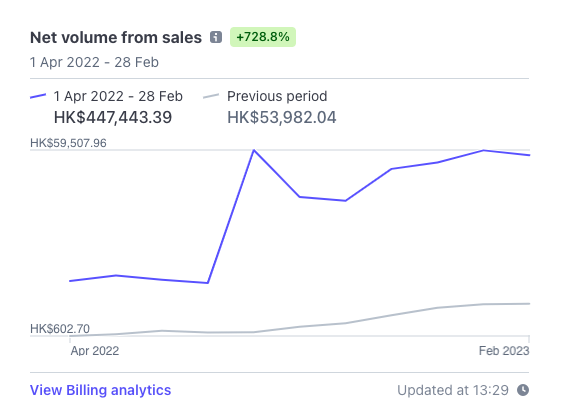
January 2023  - $59390 HKD
February 2023 - $57878 HKD
A bit of a drop, but February has three fewer days than January, so you could chalk it up as a win.
Monthly Recurring Revenue
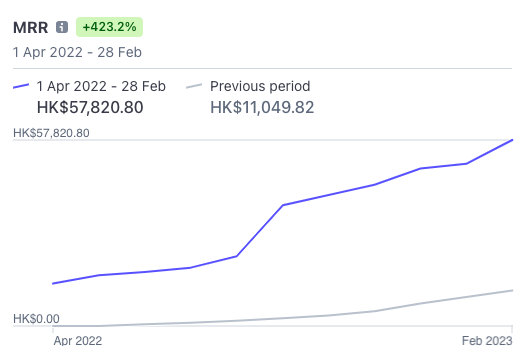
January 2023  - $50408 HKD
February 2023 - $57820 HKD
A very nice increase. This means MRR has now exceeded $7000 USD.
Week 97 - Revenue Numbers
Plumbird: It’s been a while since you’ve shared sales numbers. How’s the Bank Statement Converter doing?

It’s been pretty good.
Net Volume
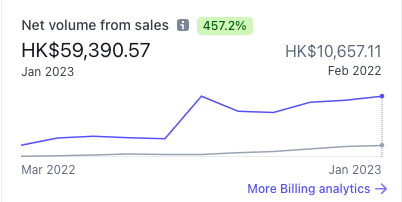
I like this number, because it’s the number of dollars that go into my bank account.
November - $53,531 HKD
December - $55,525 HKD
January - $59,390 HKD
It’s a nice steady increase. The best month we’ve had was $59,507 in August 2022. That month was a bit of an outlier because I charged one client $40,000 HKD for some one off work.
Week 84 - October Sales Review
Normally this blog goes out on a Monday, but since the month ended on a Monday I figured it would be better to wait a day. Let’s go through October’s stats.
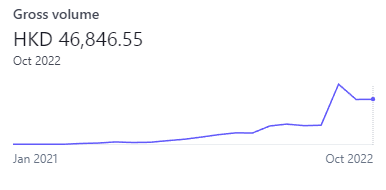
In September we brought in $46,736 HKD and this month we brought in $46,846 HKD. That’s not very much growth!
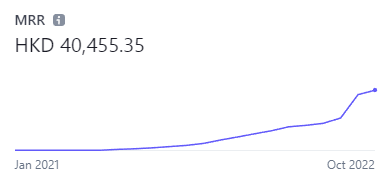
We ended October with MRR at $40,455. We ended September with MRR of $37,521.
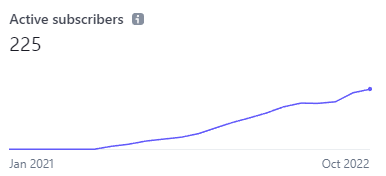
Active subscribers has gone from 212 to 225.
Week 83 - $5000 Monthly Recurring Revenue
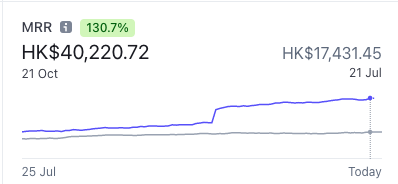
On October 21st monthly recurring revenue (MRR) exceeded the $5000 USD mark. We hit $4000 MRR on September 12th, so it took only 40 days to earn the last $1000 MRR. If MRR continues to grow at this speed, we should hit $6000 MRR on December 1st 2022.
 Plumpbirds: We’re getting tired, we don’t want any more MRR.
Last Week’s Goals
✅ 1. Contact 100 users
I emailed every user who signed up in the previous week. Sadly I only got three responses. Next time I do this I’ll write a different email.
Week 82 - Referral Feature
Last Week’s Goals
 Plumpbird: Set some harder goals this week you lazy jerk!
✅ 1. Contact 100 users
I contacted more than 100 users last week and scheduled the emails to arrive at 10 AM in whatever timezone the user was in. Sadly only four of the users replied. Some users I emailed had signed up several months ago. It might be better to email users who recently signed up.
Week 81 - Sitting on an Ants Nest
Bad News
Last week I walked from Tung Chung to Mui Wo, which is section #1 and #2 of the Lantau Trail. At the end of the trail I sat down in what turned out to be an ants nest. The ants started biting me it was pretty painful, but I got up and brushed them off. This taught me an important start-up lesson.
Do not sit on a nest of ants, but if you do, just brush them off.
Week 80 - September Sales Review
September Sales
Another month has gone by, let’s take a look at the monthly revenue graph.
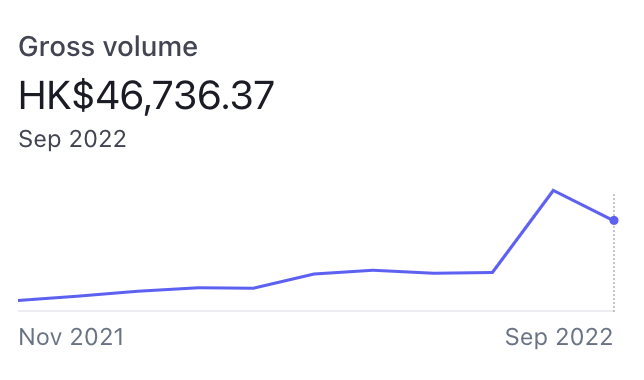
Oh no, revenue went down! In August we brought in $62,596 HKD and in September we brought in $46,736 HKD. Not great news, but it’s actually okay. This is because 60% of August’s revenue came from one off work for a single customer.
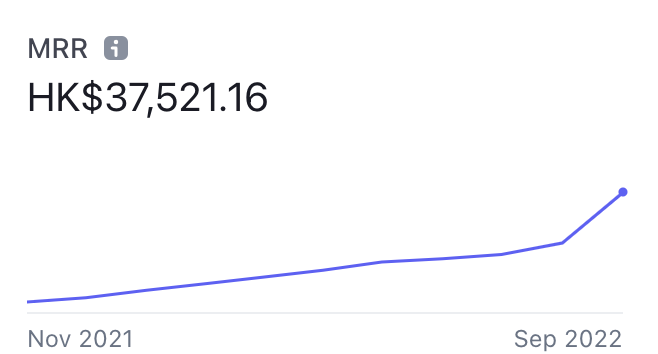
The Monthly Recurring Revenue graph is looking excellent. It increased from $21,701 HKD in August to $37,481 HKD in September.
Week 79 - Translating the App
Here’s what I got up to last week.
Becoming a Xero App Partner
I had a look at building a Xero integration for Bank Statement Converter. I created an account, poked around and looked at the API documentation. It seemed like a feasible idea. Then I looked at the approval process. It seems like I would have to build a custom app for two customers, and then would be eligible to create an app store app that anyone could purchase.
Plumping MRR from $1000 to $4000 USD

Monthly Recurring Revenue (MRR) is the most important metric when running a SaaS company. You want your MRR to be as plump as possible. On February 13th MRR was at $1000. Last week MRR exceeded $4000.
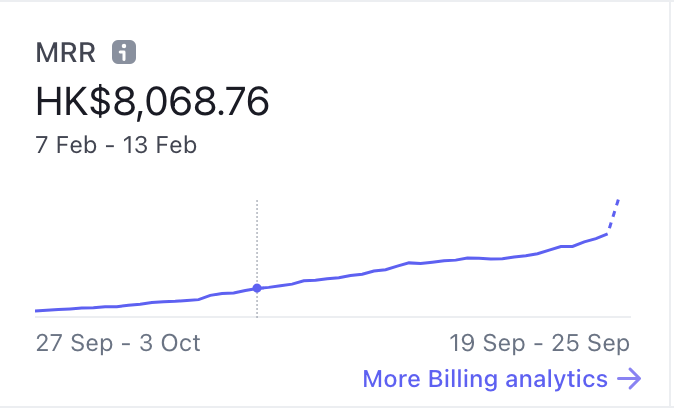
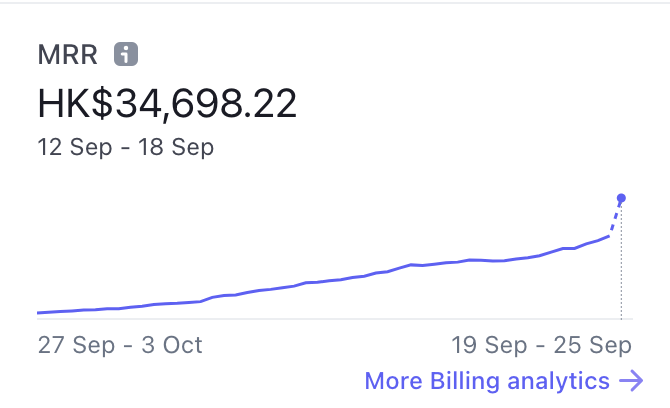
What happened across the past seven months? Why did MRR increase so much in the last week?
Letting Time Pass
A big part of it was just letting time pass and steadily getting more users. Looking at the graph there’s only one spike. That being said, in the last seven months I made 503 Git commits.