When Customers Can't Succeed
I don’t know when this started, but at some point in my life some jerk has gone and renamed “Customer Support” to “Customer Success”. It’s a pretty crappy name because it doesn’t really mean anything when you read it. You have to be in the know. You have to know that “Customer Success” means “Customer Support”, which in turn means replying to messages, emails and phone calls from customers who have some problem or question.
Wave Based Security
I usually work on this app from a shared office that I’ve been renting since January 2021. The rule is, everyone is supposed to check in at the reception desk in the lobby before going up to the higher floors.
After a while I decided to skip checking in at reception. This, as you can imagine, was really great. Walk into a building, walk into the lift, go up the lift, sit down at your desk. Perfect.
The Hours of Work Behind a Simple Feature
Since I started this website in April 2021, I knew users would upload PDF files that were password protected. I figured it would be too annoying to do the work to support these PDFs so I put it off. Recently a user asked me to support password protected PDFs, so I did it.
It’s a simple feature, and it works pretty well. I spent all of yesterday working on it and pushed it into production at 2:32 AM this morning. From the small amount of data I gathered over the last few days, it looks like around 5% of users upload PDFs with passwords. Previously I would reject the upload without even displaying an error message. A lot of those users probably went away and assumed the website didn’t work.
PDF Bank Statement JSON API
Postman Collection
Download1. Get the Authorization Token
- Go to https://bankstatementconverter.com/ in Google Chrome
- Login
- Hit F12 to open up the developer tools
- Click on the “Application” tab
- On the left panel click on “Storage” -> “Local Storage” ->
https://bankstatementconverter.com - You should see a key called “bsc-authToken” and a corresponding value.
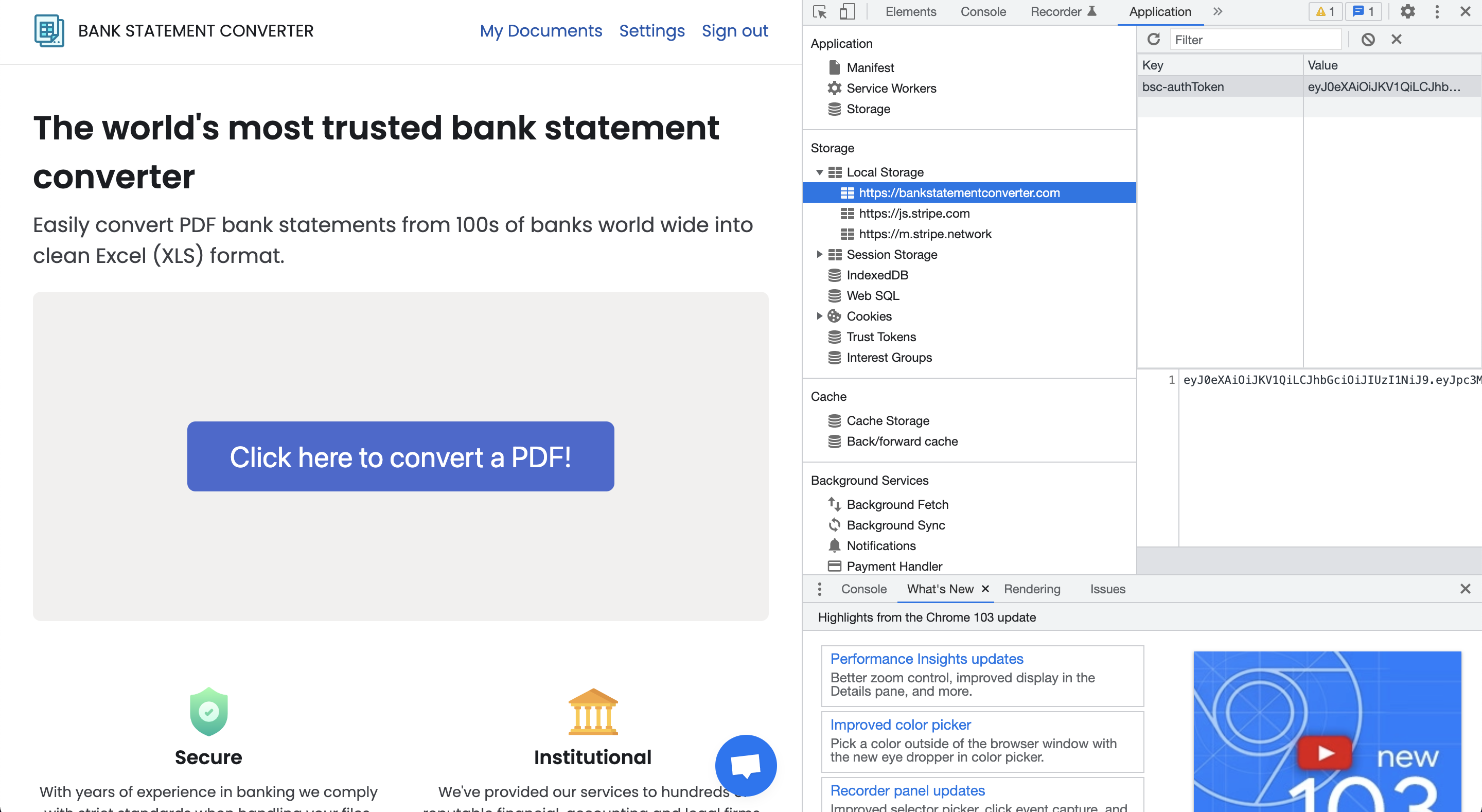
- The value is the Authorization Token. Copy the value.
2. Upload PDF API
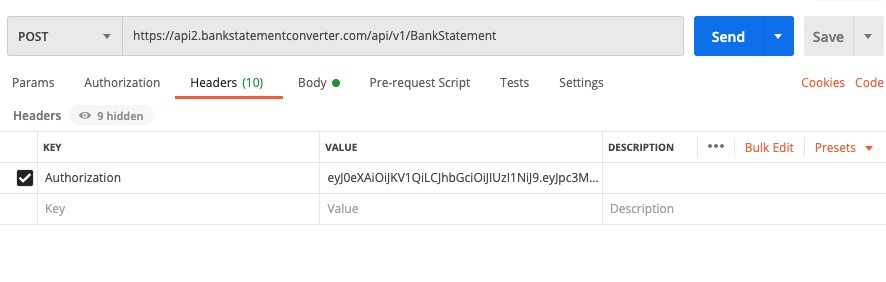
Method: POST
URL: https://api2.bankstatementconverter.com/api/v1/BankStatement
Headers: { Authorization: AUTH_TOKEN }
Body: Multipart Form Data
Request Headers
HSBC Mole Whacking Development
Last week a customer asked me to help him process a few hundred of his documents. He had PDFs for several bank accounts going back to 2018. I had a look a documents arranged a price and then got to work processing his documents. My idea was to run it through Bank Statement Converter’s (BSC) PDF to CSV processor. However a few errors occurred. BSC has a generic algorithm for detecting transaction records in a PDF file. This usually works pretty well, for many banks it works perfectly. The generic algorithm doesn’t work for a lot of statements though. To get around this, I detect the document type and then run custom code for that document.
What Year Is It?

Lately I’ve been getting a lot of complaints that the year is wrong in Bank Statement Converter’s resulting CSV. At first when I got these complaints I thought “What the hell you talking about? All we do is find the transaction data and then write it out to a CSV file. How can the year be wrong?”. Let’s walk through an what’s going on with one of my HSBC bank statements.
Automatically Get your Bank Transactions
The other day I had a bit of revelation about what problem Bank Statement Converter solves. The obvious answer seems to be “it solves the problem of extracting transaction data from PDF bank statements”. That’s true, but you could also say it solves a more general problem. “It gives user access to their bank transaction data”. However, it’s a bit of a pain to use. To get your 2021 transaction data you need to:
Getting to $1000 MRR in ten months
A few weeks ago the BankStatementConverter (BSC) exceed $1000 in Monthly Recurring Revneue (MRR). I figured you lot would be interested to hear the story
$0 MRR, March to July 2021
I got the idea to build BSC to help users process PDFs. I spent about a week playing around in Kotlin to see if my idea was feasible, it was. Soon after I meet up with a friend for beers and tell him my idea. “Do not do that, I’ve worked with PDFs before it’s a nightmare”.
Detecting Headers of the Transaction Table
This is the second part in a series of blog posts where I explain how Bank Statement Converter works. In the previous article I talked about how I extract each character and its bounding box from a PDF. In this article I’ll talk about how I use the characters and bounding boxes to deteect the headers of the transaction table.
val pageRegion = Rectangle(0f, 0f, page.cropBox.width, page.cropBox.height)
val lines = LineExtractor(page).extractLines()
val headers = headerDetector.detect(allCharacters, lines, pageRegion).map(::headerTransformer)
In the code above, we determine the size of the page, extract the graphical lines from the page and call the detect method on our TransactionHeaderDetector class. Often the graphical lines can be used to improve the quality of the headers for a table, we’ll talk about that a bit more in detail later.
Extracting Text and Bounding Boxes from a PDF
This is part one of a series of blog posts where I explain how BankStatementConverter works. In this post I’m going to explain the code that figures out the bounding boxes and other attributes of characters on a page. Lots of this code was lifted from DrawPrintTextLocations and PDFTextStripper.
First thing we do is load the PDF file using PDFBox and then we process the document page by page. The PDFs are processed page by page because we don’t run out of memory, most documents are less than ten pages long, but there are documents out there that are over 10,000 pages long, if we tried to load all the data from a large document into memory we would quickly run out and crash our app. We start the parsePage method by extracting all the characters on the page so that we end up with a list of CharAndBound objects.