Why not always OCR?
By Angus Cheng
In a previous post I talked about how OCRing the PDF would solve the problem I was facing. However, I chose to process the PDF with a different method. Someone in the hacker news comments had this to say.

This person is not wrong, but I’d like to point out some other scenarios where reading the PDF is a better solution than using OCR to process the PDF.
Identifying statements
When processing a bank statement, the first thing we do is classify the statement into a document_type. Once it is classified we run special rules for that document_type.
val documentType = classify(file);

switch (documentType) {
	"HSBC_HK_1" -> parse_hsbc_hk1(file);
	"BARCLAYS_UK_1" -> parse_barclays_uk1(file);
	else -> parse_generic(file)
}
We do this because there’s no generic solution for accurately extracting transaction data from a bank statement. Our approach is to create custom parsers for specific frequently occurring document_types. We classify statements by examining image elements, text elements or vector graphic commands.
Example #1
The PDF contains the text “Hang Seng Banking Corporation” taking up this exact bounding box. Classifying it as HSBC_HK_1.
Example #2
The PDF contains an image with this exact bounding box and the image data has this exact MD5. Classifying it as BARCLAYS_UK_1.
Example #3
The PDF contains this series of vector commands. Classifying it as CREDIT_SUISSE_1.
In the three examples above, only the first one works with when working with OCRed text. Even then, it has to be a loose match not an exact match, because the OCR bounding boxes may differ slightly.
OCR language support
OCR models don’t support every language. Amazon Textract for example supports English, German, French, Spanish, Italian and Portuguese.
That’s pretty good but it misses out a lot of commonly occurring languages like Chinese, Japanese, Arabic, Indonesian, Russian, Vietnamese and so on.
Vertically centred text
Often in bank statements description values run across multiple lines. Our software has to figure out where one description ends and another begins. Often the position on a date or amount value tells us where to delineate. For example “For statements classified as HSBC_HK_1, the beginning of a description record always has a date value. Therefore we know a new transaction record is being described when we see a date value.”
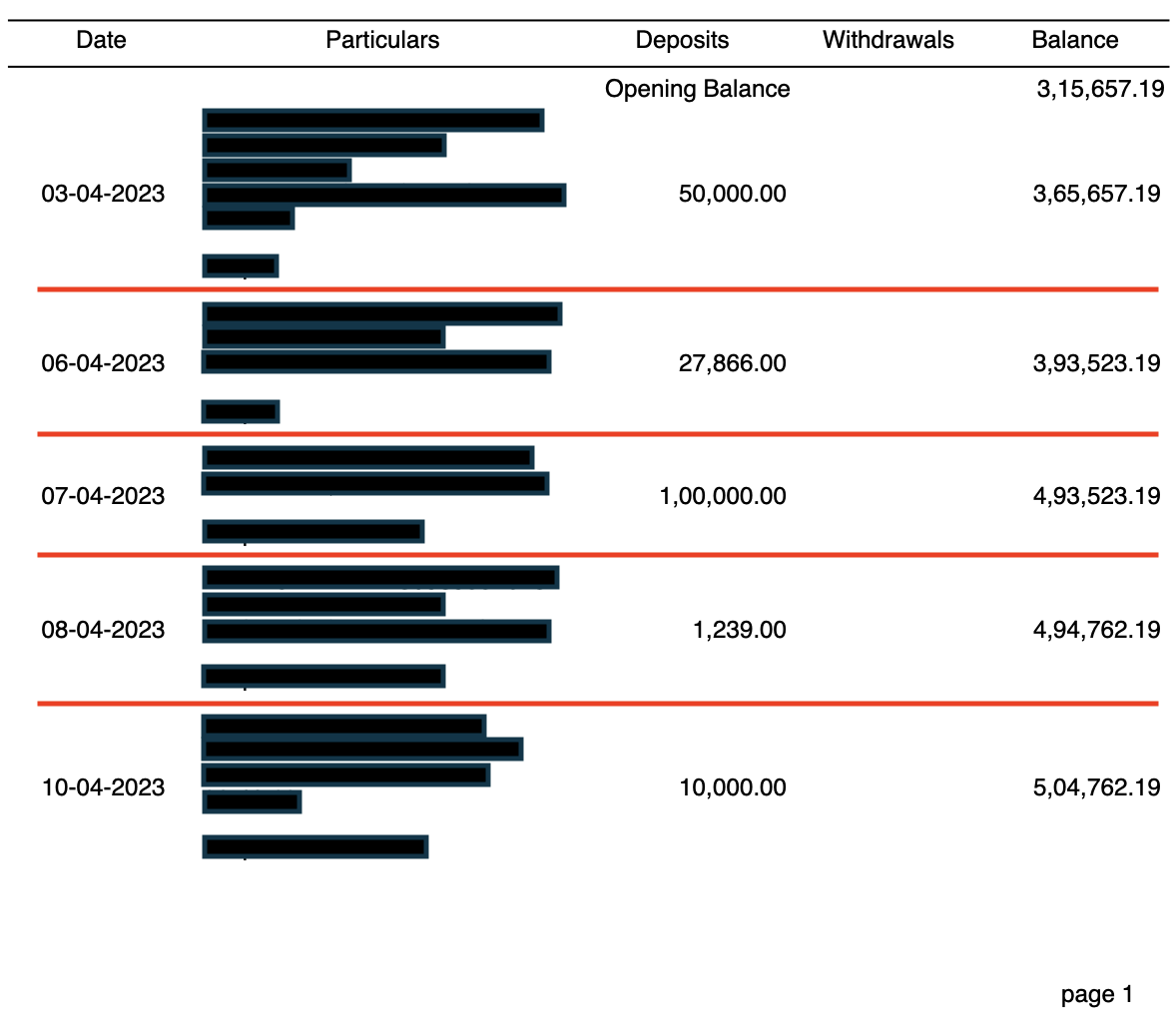
In the above PDF, the date deposit and balance values are vertically centred to the height of the description column. This makes it dilineation extremely difficult. Luckily the PDF is encoded in “column order”.
//Date column
Move to position 0,0
Draw Text "DATE_VALUE"

//Description column
Move to position 50,0
Draw Text "DESCRIPTION_LINE_1"
Move to position 50,20
Draw Text "DESCRIPTION_LINE_2"
Move to position 50,40
Draw Text "DESCRIPTION_LINE_3"

//Deposit column
Move to position 250,0
Draw Text "DEPOSIT_VALUE"

//Balance column
Move to position 300,0
Draw Text "BALANCE_VALUE"
The order the text elements are encoded in the PDF can be used to determine the beginning and end of the description text elements. The encoding order is not available to you if you’re working with output from an OCR system.
Processing the same statement with OCR output is probably possible. I think it would require matching based on text elments that are equidistant from a date value. It sounds hard to write and perhaps error prone.
Obstructed description

I’ve blacked out the description in this PDF. That doesn’t really matter because you can’t see the key feature of this PDF anyway. The descriptions are very long, and instead of wrapping, they appear under Debit, Credit and Balance columns.
An OCR model will not be able to extract what it cannot see, but the data is in there. If you convert a statement from this bank with Bank Statement Converter you actually get more data than your eyes can see. That’s pretty special.
Conculsion
There’s a lot more data than what an OCR model can see. In some cases OCRing is excellent but in other cases it will not give you the result you want. Don’t be afraid to dive deep and actually figure out how something complicated works. Often it’s not really that complicated anyway.